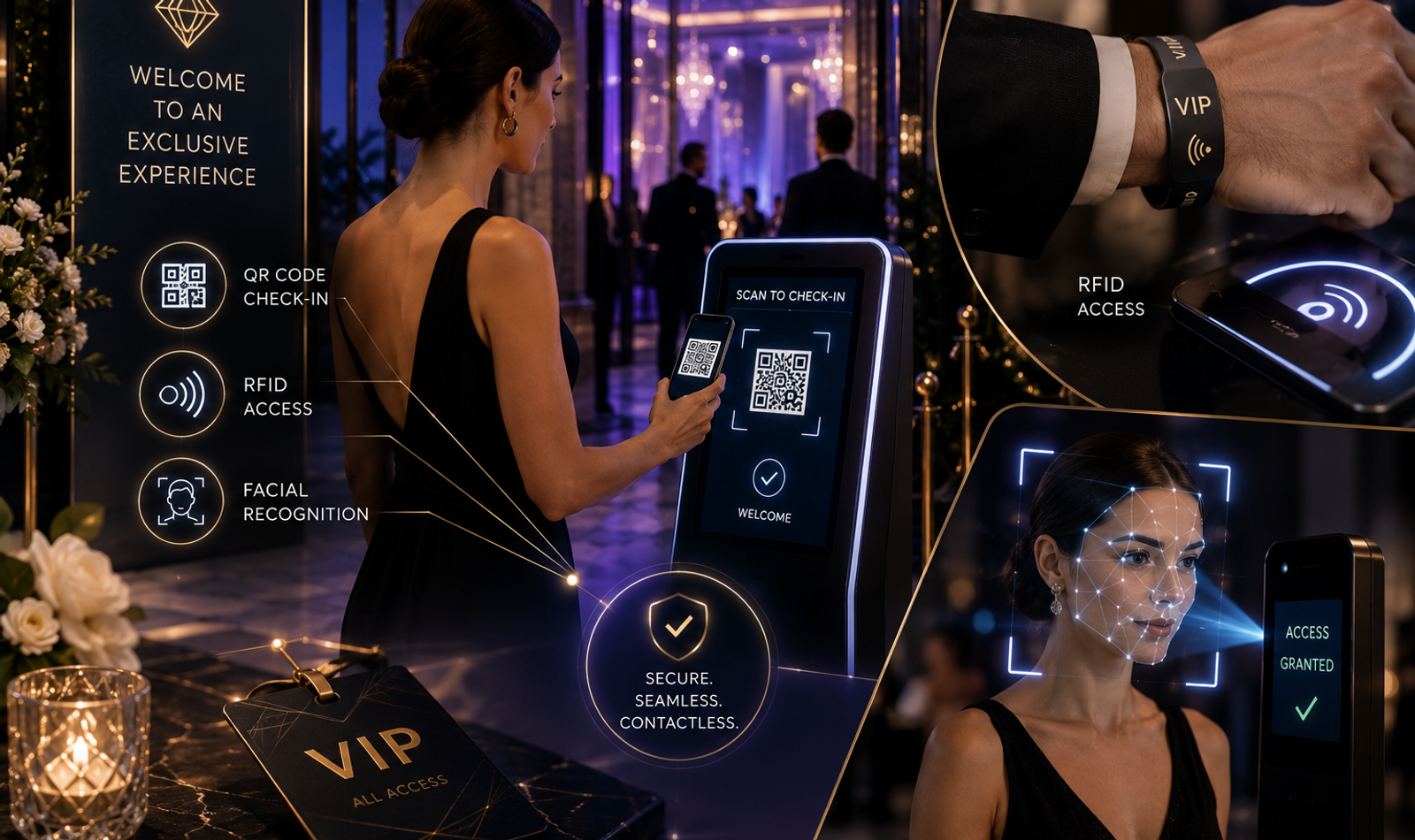
Contactless Check-In Systems for High-End Events: QR, RFID and Facial Recognition Explained
The entrance of a high-end event creates the first physical impression of the experience. Before guests see the décor, cuisine, entertainment or stage, they encounter the access system, security team and registration process. A slow or confusing check-in can immediately weaken the sense of luxury created by the wider production.
Contactless event check-in systems help organisers verify guests, control access and monitor attendance without depending entirely on printed lists or manual name searches. Technologies such as QR codes, RFID credentials and facial recognition can reduce repetitive interactions while improving operational visibility.
However, introducing technology does not automatically create a premium experience. A poorly configured scanner, unreliable network or unclear privacy process can create more friction than a traditional welcome desk. The technology must therefore be selected according to the event’s scale, audience, venue and security requirements.
For luxury weddings, corporate summits, private previews, hospitality launches and celebrity-attended events, the strongest check-in system combines digital efficiency with human hospitality. Guests should experience speed and recognition without feeling processed by a machine.
Quick Answer
QR codes are generally the simplest contactless check-in option because guests can present a unique code on their phone or invitation. RFID credentials are useful when organisers need repeated access checks, cashless interactions or movement between several zones. Facial recognition can provide identity-based verification but requires stronger consent, privacy, testing and alternative access processes.
The correct solution depends on the event’s attendance, risk level, guest profile, venue layout and desired experience. Many premium events benefit from a hybrid system rather than relying on one technology for every guest and every situation.
What Is Contactless Event Check-In?
Contactless event check-in is a registration and access process that verifies a guest using a digital credential or automated identity method. The guest may present a QR code, tap or approach an RFID credential, or use an approved facial-verification system.
The technology checks the credential against the event database and confirms whether the person has valid access. It may also update attendance status, display seating information, activate event permissions or alert a relationship manager that a priority guest has arrived.
Contactless does not necessarily mean that no team member is present. Premium events still require welcome staff, security personnel and guest managers to provide assistance. The technology reduces repetitive verification so that the team can focus on hospitality and exceptions.
A successful system should make the entry feel faster and calmer. Guests should understand what to present, where to go and what will happen if the technology does not work.
Why High-End Events Need Smarter Check-In Systems
Traditional event registration often depends on printed guest lists and manual name searches. This may work for small gatherings, but it becomes difficult when hundreds of guests arrive within a short period or when several access categories are involved.
Luxury events may include family members, celebrities, investors, sponsors, speakers, media representatives, performers and general attendees. These guests may require different entrances, seating zones, lounges or programme access. A digital check-in system can connect each credential to the correct permissions.
Real-time attendance information also helps teams understand who has arrived and who is still expected. The host or relationship manager can be alerted when a priority guest checks in, allowing the welcome to feel more personal.
The objective is not simply to replace paper with technology. It is to create a check-in experience that supports guest recognition, access control, security and event operations through one connected system.
For more detailed planning around arrivals and movement, see on-site guest flow, registration, entry and seating.
How QR Code Event Check-In Works
A QR code is a machine-readable two-dimensional code that can contain or represent a unique guest credential. For event check-in, the code is usually included in a digital invitation, confirmation email, WhatsApp message or event application.
When the guest arrives, the code is presented on a phone or printed invitation. A staff member or self-service device scans it, and the registration platform checks whether the credential is valid. The system then marks the guest as arrived and may display additional instructions.
The QR code should ideally connect to a unique guest record rather than displaying sensitive information directly. The visible code can function as a token that allows the event platform to retrieve the relevant access status securely.
QR check-in is widely suitable because most guests already carry smartphones and understand how scanning works. It can also be implemented without issuing physical cards or wristbands before the event.
Benefits of QR Code Check-In
QR codes provide a practical balance between speed, cost and ease of use. They can be distributed digitally, updated through the event platform and scanned using dedicated devices or compatible smartphones.
The system can reduce manual name searches and give organisers real-time attendance data. It can also support different guest categories by linking each code to a specific access level, seating zone or hospitality instruction.
Useful QR applications include:
• Digital invitations
• Fast guest entry
• VIP access lanes
• Session verification
• Seating information
• Gift collection
QR systems are particularly effective for one-day events, corporate conferences, private previews and luxury weddings where the primary requirement is quick guest verification.
Static and Dynamic QR Credentials
A static QR credential remains visually and functionally unchanged after it has been created. It may contain a fixed identifier or link. This approach can be simple, but it provides limited control once the credential has been distributed.
A dynamic credential can connect to a server-managed record that may be updated, revoked or restricted. The visual code may remain the same while the permissions behind it change. This gives organisers more flexibility when guests cancel, access levels change or an invitation is transferred with approval.
For high-end events, server-validated credentials are generally more useful than codes that contain all information directly. The event team can change the guest’s status without reissuing the complete invitation.
Regardless of the method, the system should prevent the same credential from being used repeatedly without approval. Once a guest checks in, a second scan should create an alert or require senior verification.
Preventing QR Code Misuse
A screenshot of a QR code can potentially be forwarded to another person. Organisers should not assume that possession of the image always proves the identity of the guest.
For low-risk events, the QR code may be sufficient when supported by a visible name and trained welcome team. For private or high-security gatherings, the team may also verify the guest’s identity or match the code with the approved guest record.
The system should record duplicate scans and provide a clear exception process. Staff should not publicly accuse a guest of misuse, because the duplicate may have resulted from an accidental rescan or an authorised companion.
Time-limited credentials, rotating tokens or identity confirmation can provide additional protection where the event requires it. The level of security should match the actual risk rather than making every guest complete an unnecessarily complex process.
Designing a Premium QR Check-In Experience
The QR code should be easy to locate in the guest communication. It should not be hidden inside a long email or placed against a design that makes scanning difficult. Clear instructions should explain whether the guest needs to download, save or present the code.
At the venue, scanners should be positioned before queues become congested. Lighting, screen brightness and internet connectivity should be tested in the actual entrance environment. A system that works during an office demonstration may behave differently at an outdoor venue.
The scanning team should be trained to greet guests before requesting the credential. The interaction should feel like a welcome supported by technology, not a security checkpoint without hospitality.
Guests who cannot find their code should have access to a separate support process. The main queue should continue moving while the exception is resolved discreetly.
How RFID Event Check-In Works
RFID stands for radio-frequency identification. An RFID system generally uses a credential containing a tag and a reader that communicates with that tag through radio signals.
For events, the credential may be placed inside a wristband, card, badge, lanyard or premium invitation. When the guest approaches or taps the credential near an authorised reader, the system detects the identifier and checks the associated permissions.
Different RFID systems operate at different frequencies and reading distances. Some are designed for close-range taps, while others can detect compatible tags from a greater distance. The correct system depends on whether the event requires controlled entry, rapid throughput or broader movement tracking.
RFID is useful when guests need to use the same credential repeatedly throughout the event. It can support access to lounges, sessions, hospitality zones or multi-day programmes without requiring the guest to reopen a digital invitation each time.
Benefits of RFID Credentials
RFID can create a smooth access experience because the guest may only need to tap or present a card or wristband. The system can read the credential quickly and connect it to the guest’s permissions.
The same credential can also support several event functions. It may be used for room access, session entry, cashless payment, gift redemption or hospitality entitlements depending on the system design.
Common RFID uses include:
• Multi-zone access
• Repeat verification
• Cashless payments
• Session tracking
• Hospitality control
• Secure credentials
For multi-day festivals, conferences, destination weddings and large premium experiences, RFID can provide greater flexibility than a single-entry QR code.
RFID Wristbands, Cards and Badges
RFID wristbands are commonly used when guests require a credential that remains with them for several hours or days. They can be suitable for festivals, private hospitality zones and events involving repeated entry.
Cards and badges may feel more appropriate for corporate conferences, investor events and professional gatherings. They can display the guest’s name, organisation and access category while containing an embedded digital identifier.
Luxury events may integrate RFID into premium materials such as customised cards, metal-look badges or designed wristbands. However, the appearance should not compromise reading performance or comfort.
The physical credential should match the event’s visual identity while remaining easy to replace. A lost card or damaged wristband should not prevent a verified guest from receiving assistance.
RFID Reading Range and Venue Design
RFID reading distance depends on the technology, reader configuration, tag design and physical environment. Organisers should not choose a system based only on the maximum range described by a supplier.
Metal structures, liquids, crowd density and reader placement can affect performance. The system should be tested inside the actual venue rather than only in a controlled office environment.
Close-range access can provide greater intentionality because the guest must deliberately tap or present the credential. Longer-range detection may improve flow but requires more careful zone design to prevent unintended reads.
Every reader should be mapped to a specific operational purpose. Overlapping zones can create inaccurate attendance information or allow a credential to trigger the wrong action.
Preventing RFID Credential Sharing
A physical credential can be transferred from one person to another unless the event has an additional identity process. Whether this matters depends on the risk and exclusivity of the event.
A general conference wristband may only need to confirm that one paid credential is present. A private investor gathering or celebrity event may require the credential to remain linked to a named individual.
The organiser may combine RFID with visual identification, a guest photograph or staff recognition at restricted zones. The additional verification should be reserved for areas where the risk justifies it.
RFID credentials should also have a clear process for loss, replacement and deactivation. When a new credential is issued, the old identifier should be disabled to prevent both from remaining active.
How Facial Recognition Check-In Works
Facial recognition compares facial features from a captured image with one or more previously enrolled images. In an event environment, this may be used to confirm whether the arriving person matches the identity linked to a registration record.
A verification process usually compares the arriving guest with a claimed identity or a specific enrolled profile. An identification process may search across a larger database to determine who the person is. These are different applications and involve different operational and privacy considerations.
For premium events, identity verification is generally easier to explain and control than silently searching every arriving face against a large gallery. The guest can actively enter a facial-verification lane after receiving clear information and providing the appropriate permission.
Facial recognition should never be treated as an invisible shortcut. Guests must understand how the process works, what information is used and what alternative is available if they do not wish to participate.
Benefits of Facial Recognition Check-In
Facial verification can reduce the need for guests to search for codes, cards or invitations. Once correctly enrolled, the guest may be verified through a camera-supported process and directed toward the correct access route.
This may be valuable for invitation-only experiences where credentials could be transferred or forwarded. The biometric comparison connects the access decision more closely to the registered person.
Facial recognition can also support a more seamless VIP arrival when it is implemented transparently and tested carefully. A guest who has chosen the method may be recognised without presenting a separate credential.
However, convenience alone does not justify the system. The organiser must consider privacy, accuracy, guest consent, storage, security and the availability of a reliable alternative.
Facial Verification Versus Identification
Facial verification asks whether an arriving person matches a specific identity they have claimed. For example, a guest may first enter their registration reference and then complete the facial comparison.
Facial identification searches a broader database to determine which enrolled person the arriving guest may be. This can create a faster experience but involves a wider comparison and greater operational responsibility.
Verification can be more appropriate for many private events because it limits the comparison to a specific claimed record. It can also make the guest’s participation more explicit.
The event team should understand which method the supplier is actually using. Marketing phrases such as “AI face entry” may hide important differences in how data is processed and matched.
Accuracy and Real-World Conditions
Facial-recognition performance depends on the selected system and the quality of the images used. Lighting, camera angle, image resolution, facial coverings and changes in appearance can influence the check-in result.
The event should be tested with realistic guests and venue conditions. A demonstration using controlled lighting and carefully positioned participants does not prove that the system will perform equally well during peak arrival.
No guest should be denied or embarrassed solely because an automated comparison does not succeed. The result should trigger a respectful manual verification process rather than a public confrontation.
The system should also be assessed for consistent performance across the expected guest population. Technology selection must include independent testing, supplier evidence and an understanding of error handling.
Consent and Guest Choice
Facial recognition involves personal identity information and requires more careful planning than a basic event credential. Guests should receive clear information before enrolment about the purpose, process, storage and retention of their data.
Participation should not be presented as the only way to attend unless the organiser has a valid and carefully reviewed reason. A QR, physical credential or manual verification route should generally remain available.
The alternative should be practical rather than intentionally slow or inconvenient. Guests should not feel pressured into biometric processing because the non-biometric lane has been designed poorly.
Consent and privacy communication should use language that guests can understand. A long legal notice hidden inside registration does not create a premium or transparent experience.
Data Retention and Deletion
The organiser should decide how long check-in records, photographs and biometric templates need to be retained. Keeping event data indefinitely increases risk without necessarily improving the guest experience.
Information should be collected for a defined purpose and reviewed after the event. Data that is no longer required for access, reporting or legitimate follow-up should be deleted or de-identified according to the applicable policy.
The event agreement should clarify whether the organiser, venue or technology supplier stores the information. It should also define who can access it and how deletion requests are handled.
Facial images and templates require particular attention because replacing a compromised biometric characteristic is not comparable to changing a password. Security and retention decisions must therefore be made before enrolment begins.
For broader privacy planning, see guest data privacy at luxury events.
QR, RFID or Facial Recognition: Which Is Best?
There is no single contactless check-in technology that is best for every high-end event. The decision should reflect guest expectations, security requirements, operational complexity and budget.
QR codes are generally practical for one-time entry and digital invitations. They are familiar to guests and can be deployed without producing physical credentials.
RFID is more suitable when attendees need repeated access across several zones or days. It can also support integrated functions such as cashless interactions and entitlement management.
Facial recognition may be considered when identity assurance and hands-free entry create genuine value. It requires the strongest privacy, consent, testing and alternative-access planning.
Choosing QR Code Check-In
QR check-in is often suitable for private dinners, corporate gatherings, brand launches, weddings and conferences. It works well when the primary requirement is confirming that an invited guest has arrived.
The system can be distributed digitally and integrated with the RSVP database. It is relatively simple for guests to understand and can support different access permissions.
QR codes may become less convenient when guests repeatedly enter different zones throughout the day. Constantly reopening a message or application can create friction.
For simple or medium-complexity events, QR is often the most balanced starting point. Strong exception handling remains essential because phones, screens and credentials can fail.
Choosing RFID Check-In
RFID is useful for multi-day events, large conferences, festivals and hospitality experiences involving several access zones. The credential can remain with the guest and be used repeatedly.
It can also support programme tracking, meal entitlements, gifts and controlled lounge access. This creates one connected identity across several event services.
RFID requires more physical infrastructure than a basic QR system. Cards or wristbands must be produced, encoded, distributed and replaced when lost.
The technology becomes valuable when the credential solves several operational problems rather than being introduced only for novelty. The organiser should assess whether the additional infrastructure produces a meaningful improvement.
Choosing Facial Recognition
Facial recognition may be considered for highly controlled private events, premium membership experiences or selected VIP entry. It should only be used when identity-based verification creates a clear benefit.
The organiser must evaluate the supplier, consent process, security architecture, accuracy and data lifecycle. A reliable manual or non-biometric alternative must also be planned.
Facial recognition should not be introduced only because it looks futuristic. Technology that makes guests uncomfortable can weaken the luxury experience even when it operates correctly.
The strongest use cases are transparent, voluntary and limited. The system should perform a clearly defined function rather than becoming an unnecessary surveillance layer.
Using a Hybrid Check-In System
Many high-end events benefit from combining technologies. General attendees may use QR codes, while multi-day delegates receive RFID badges and selected VIP guests choose facial verification.
A hybrid model allows the organiser to match the technology to the guest journey. It also prevents one system from becoming a single point of failure.
However, the processes must remain connected through one guest database. Separate QR, RFID and facial systems can create conflicting information when they do not update the same attendance record.
The event team should understand which credential applies to each category. Guests should receive clear instructions so that the choice of technology does not create confusion at the entrance.
Designing the Complete Check-In Journey
Technology selection is only one part of the process. The organiser must map the guest journey from vehicle arrival to final entry.
This includes signage, security, queue formation, device positioning, registration counters and the handover to hospitality teams. Every transition should be tested before the event.
The team should estimate peak arrival rather than average attendance. Luxury weddings and corporate launches often experience concentrated arrival periods because programme timing is fixed.
The system should also distinguish between regular check-in and exception handling. Missing credentials, unregistered companions and technical failures should be resolved away from the main flow.
For the wider experience, see how to design a seamless guest journey for luxury events.
Creating Different Access Lanes
Different guest categories may require different check-in processes. General attendees, VIPs, media, speakers and performers may not use the same entrance.
Separate lanes can improve efficiency when they reflect genuine operational differences. They should not be created simply to display hierarchy.
The lane signage should be clear without revealing sensitive guest categories publicly. Staff should know how to redirect someone respectfully if they approach the wrong area.
Every lane should connect to the same approved guest information. A separate VIP entrance should not depend on an outdated list or isolated spreadsheet.
Maintaining Human Hospitality
Contactless check-in should not remove the human welcome from a luxury event. Guests may appreciate speed, but they still expect recognition and assistance.
The team should greet the guest before or immediately after the credential is scanned. The result can then guide the guest toward seating, hospitality or the appropriate host.
Technology should handle repetitive verification while people manage emotion, context and exceptions. A scanner cannot reassure an elderly guest, resolve a relationship concern or welcome a nervous speaker.
The strongest experience combines automation with attentive staff. Efficiency should create more time for hospitality rather than reducing every interaction to a transaction.
For larger or more complex events, the complete guide to guest management for premium events and weddings can support this planning.
Planning Offline and Manual Backups
Every contactless system requires a fallback plan. Internet connectivity, devices, cameras, power supplies and cloud platforms can fail.
The team should maintain offline access to the approved guest list and a method for recording manual arrivals. Backup devices, power banks and printed information may also be required.
When the primary system returns, manually recorded attendance should be reconciled carefully. Duplicate or incomplete entries can affect reporting and access permissions.
The backup process should be rehearsed before the event. Teams should not discover how to operate manually after a queue has already formed.
Protecting Guest Information
The event database may contain names, contact details, access categories, photographs and attendance records. Access to this information should be limited according to operational responsibility.
Registration staff may require names and credentials, while hospitality teams may only need relevant service notes. Not every team member should see the complete guest profile.
Devices used at the entrance should be secured, and staff accounts should not be shared casually. Screens should also be positioned so that one guest cannot view another person’s information.
The organiser should review the technology supplier’s storage, security and deletion practices. Responsibility for guest data continues even when an external platform operates the check-in system.
Testing Before the Event
A full technical test should take place inside the venue using the actual devices and expected network. The test should include realistic lighting, crowd movement and different credential formats.
The team should check phone screens, printed QR codes, RFID materials and facial-verification positions. VIP alerts, seating displays and duplicate-scan warnings should also be reviewed.
Testing should include unsuccessful situations, not only ideal demonstrations. The team must know what happens when a credential has expired, a wristband is damaged or a face cannot be matched.
A successful rehearsal measures both technology and staff response. The system is only ready when the complete guest journey can continue during an exception.
Training the Check-In Team
The registration team should understand more than how to operate a scanner. They need to know the event categories, access rules and escalation process.
Training should cover guest communication, privacy, device use and exception handling. Staff must know what they can resolve independently and when a senior person must intervene.
The team should never discuss sensitive information loudly or display visible frustration. A premium welcome requires composure even when the technology produces an unexpected result.
Role-based rehearsals can prepare staff for duplicate QR codes, missing RFID cards, unregistered companions and facial-verification failures. Confidence protects both flow and guest dignity.
Common Contactless Check-In Mistakes
The first common mistake is selecting technology because it appears modern rather than because it solves a real event problem. Unnecessary complexity can create longer queues and higher risk.
Another mistake is relying on one system without a backup. Even a well-tested platform can be affected by connectivity, device or power failure.
Poor guest communication can also create delays. Guests who do not know where to find their QR code or how facial enrolment works will require additional assistance at arrival.
Privacy and retention are frequently considered too late. These decisions should be made before data collection, contracts and guest communication begin.
The ACCESS Check-In Framework
The ACCESS framework can help organisers plan a reliable contactless entry experience. It connects technology selection with security, hospitality and operational readiness.
Assess the Event by understanding attendance, guest categories, venue conditions and security requirements. Technology should be selected only after the real problem is defined.
Choose the Credential by deciding whether QR, RFID, facial verification or a hybrid system best supports the guest journey. The choice should reflect both convenience and risk.
Connect the Database so every credential updates one approved guest record. Separate technologies should not create separate versions of attendance.
Establish Privacy through clear purpose, access controls, consent where required and defined retention. Guests should understand how their information is used.
Support Exceptions through manual verification, offline lists and trained senior decision-makers. The alternative process should remain respectful and efficient.
Study Performance after the event by reviewing waiting times, failures, duplicate scans, privacy concerns and guest feedback. These insights should improve the next event.
Measuring Contactless Check-In Performance
The success of a check-in system should not be measured only by whether the technology worked. Organisers should review how the complete entry experience performed.
Useful indicators include average check-in time, peak queue length and the number of manual exceptions. Duplicate credentials, failed scans and device downtime should also be recorded.
For facial recognition, the team should monitor how frequently manual verification was required. The results should be reviewed across the expected guest population rather than only as one overall number.
Guest feedback is also important. A fast system that creates discomfort, confusion or privacy concerns cannot be considered fully successful.
For broader event analytics, see event guest analytics: behaviour, engagement and satisfaction.
Frequently Asked Questions
What Is Contactless Event Check-In?
Contactless event check-in verifies a guest through a digital or automated credential such as a QR code, RFID card or approved facial-verification system. It can update attendance and access permissions without relying entirely on manual name searches.
How Does QR Event Check-In Work?
Each guest receives a unique QR credential linked to their registration record. The code is scanned at entry, and the event platform confirms whether the guest has valid access.
Can Someone Share a QR Code?
A QR image can potentially be forwarded or copied. Organisers can reduce misuse through duplicate-scan alerts, identity confirmation, dynamic credentials and controlled exception handling.
What Is RFID Event Check-In?
RFID check-in uses a tag inside a card, badge or wristband. A compatible reader detects the identifier and checks the access permissions linked to the guest.
Is RFID Better Than QR?
RFID is often better for repeated access, multi-day events and several controlled zones. QR codes are generally simpler for one-time entry and digitally distributed invitations.
How Does Facial Recognition Check-In Work?
The system compares the arriving guest’s facial features with an enrolled image or profile. It may be used for verification of a claimed identity or identification against a larger database.
Should Facial Recognition Be Mandatory?
Luxury events should carefully assess whether mandatory biometric processing is necessary and legally appropriate. A practical non-biometric alternative should generally be available.
Is Facial Recognition Always Accurate?
No automated recognition system is perfect. Performance depends on the algorithm, images, lighting, camera conditions and implementation, so manual verification must remain available.
Do Contactless Systems Need Internet?
Some systems require live connectivity, while others can support offline or local verification. Organisers should confirm the technical architecture and prepare a manual backup.
What Happens if a Phone Dies?
The guest should be verified through a backup process using their name, contact details or approved identification. A dead phone should not prevent a legitimate guest from receiving assistance.
Can QR and RFID Be Used Together?
Yes. QR may support invitation entry, while RFID can be issued for repeated access inside the event. Both systems should update one central guest database.
How Long Should Check-In Data Be Stored?
Data should be retained only for a defined operational, reporting or lawful purpose. The organiser should establish retention and deletion rules before the event.
What Is the Best Option for Luxury Weddings?
QR check-in is often suitable for general wedding guests, while RFID may help with multi-day destination events. Facial recognition should be limited to cases where it provides clear value and guests receive transparent choice.
What Is Best for Corporate Events?
QR codes work well for general delegates, and RFID can support session or lounge access. High-security corporate events may add identity verification where appropriate.
How Should VIP Check-In Be Managed?
VIPs should have a relationship owner, prepared arrival route and fast verification process. The technology should support discreet recognition rather than creating a public display.
For high-profile arrivals, celebrity management may also need to be coordinated with entry, security and holding-area planning.
Does Double Trouble Studio Provide Contactless Check-In Planning?
Double Trouble Studio supports luxury weddings, corporate events, launches and celebrity-attended experiences with guest databases, RSVP systems, QR check-in, credential planning, VIP access, entry flow and on-ground guest management.
How Double Trouble Studio Plans Contactless Event Entry
Double Trouble Studio approaches contactless check-in as part of the complete guest journey rather than an isolated technology installation. The system must connect invitation management, guest data, security, hospitality and venue movement.
Our work can include guest database planning, RSVP workflows, digital credentials, QR check-in, RFID access design and VIP arrival coordination. We also help map entry lanes, exception handling, staff responsibilities and backup processes.
Where biometric technology is being considered, privacy, consent, alternatives and data handling must form part of the planning from the beginning. Technology should improve the guest experience without reducing trust.
Each solution is designed according to the event’s scale, venue, audience and security profile. The objective is to create an entry that feels fast, secure, discreet and genuinely premium.
Conclusion
Contactless check-in systems can transform the entrance experience of a high-end event when they are selected and implemented carefully. QR codes provide accessible digital verification, RFID supports repeated interactions and facial recognition can offer identity-based access in appropriate situations.
The technology alone does not create luxury. The guest communication, privacy controls, team training, backup process and hospitality surrounding it determine how the system feels.
A successful entrance combines speed with discretion and security with warmth. Guests should never feel embarrassed because a code, card or automated comparison has failed.
When the database is accurate, devices are tested and teams are prepared, contactless technology becomes almost invisible. The guest simply experiences a smooth and confident welcome.
Plan Contactless Event Check-In with Double Trouble Studio
A high-end event should feel seamless from the vehicle drop-off to the final welcome inside the venue. Double Trouble Studio designs contactless check-in and guest-management systems for luxury weddings, corporate summits, private previews, hospitality launches and celebrity-attended events.
Our approach can combine RSVP management, QR credentials, RFID access, VIP mapping, registration, security coordination, entry flow and on-ground hospitality. Every solution is designed around the event’s audience, venue and operational requirements.
Connect with Double Trouble Studio to create a contactless guest-entry experience that feels efficient, secure and premium.
📩 info@dtsworld.in 📞 +91 80000 06021 📍 Andheri (West), Mumbai
Need this for your brand?
Let DTS build your next campaign.
From PR, celebrity management and events to websites, social media, SEO and AI video production — Double Trouble Studio helps brands grow with strategy and execution.
Discuss Your Requirement →