On-Page SEO Checklist for Higher Rankings
On-page SEO is one of the most important parts of search engine optimization because it improves the pages that already exist on your website. It helps search engines understand your content, helps users find useful answers and helps your website rank for relevant keywords.
Many businesses invest in website design, social media and paid ads, but ignore the basic SEO structure of their pages. As a result, the website may look good but fail to rank. A page may have good information, but if the title, headings, URL, content structure, internal links, image alt text and user experience are weak, search engines may not understand it clearly.
On-page SEO solves this problem.
It makes every important page more search-friendly, user-friendly and conversion-focused.
Professional website development and digital marketing services can help connect on-page SEO with technical performance, UX, content strategy and lead generation.
In 2026, on-page SEO is also important for AI Overview optimization, GEO and answer-engine visibility. Search engines and AI-powered search systems need clear, helpful and structured content that answers real user questions. A well-optimized page has a better chance of ranking in traditional search results and appearing in AI-driven search experiences.
This guide gives you a complete on-page SEO checklist for higher rankings. It is written for beginners, business owners, marketers, website teams and brands that want better organic traffic, stronger visibility and more qualified leads.
What Is On-Page SEO?
On-page SEO is the process of optimizing individual website pages so they can perform better in search results.
It includes all the improvements you can make directly on the page. These improvements include title tags, meta descriptions, URLs, headings, content, keywords, images, alt text, internal links, schema markup, page speed, mobile experience and calls to action.
Businesses that are new to SEO can begin with a detailed beginner’s guide to search engine optimization to understand how on-page, off-page and technical SEO work together.
The goal of on-page SEO is simple.
Your page should clearly tell search engines and users what the page is about, why it is useful and what action the visitor should take next.
For example, if your page is about SEO services, the content should clearly explain your SEO services, process, benefits, proof, FAQs and contact options. If your blog is about an on-page SEO checklist, it should provide a practical checklist that readers can actually use.
Good on-page SEO is not only about adding keywords.
It is about making the page helpful, structured, clear and trustworthy.
Why On-Page SEO Matters
On-page SEO matters because search engines need clear signals to understand your page.
When a page has a strong title, clear headings, useful content, optimized images, proper internal links and fast loading speed, it becomes easier for search engines to crawl, index and rank it.
On-page SEO also improves user experience.
A well-structured page helps visitors quickly find what they are looking for. It reduces confusion and increases the chances that users will stay longer, read more and take action.
For businesses, this can lead to better organic traffic, more enquiries, stronger brand trust and higher-quality leads.
A page that ranks but does not convert is incomplete.
A strong on-page SEO strategy helps your page rank, inform and convert at the same time.
Start With Search Intent
Search intent means the reason behind a user’s search.
Before optimizing any page, you must understand what the searcher wants.
Someone searching “what is SEO” wants a beginner explanation. Someone searching “SEO agency in India” may be looking for a service provider. Someone searching “on-page SEO checklist” wants practical steps. Someone searching “best SEO tools” wants recommendations or comparisons.
Your page must match the intent.
If the searcher wants a checklist and your page gives only a short definition, it will not satisfy the query. If the searcher wants to hire an agency and your page only explains theory, it may not convert.
Every page should be built around one clear intent.
Ask yourself what the user wants to learn, compare or do. Then create the page structure around that need.
Search intent is the foundation of higher rankings.
Choose One Primary Keyword
Every important page should have one primary keyword.
The primary keyword is the main search phrase you want the page to rank for.
For this blog, the primary keyword is “On-Page SEO Checklist.”
A service page may target “SEO services in India.” A local page may target “digital marketing agency in Chandigarh.” A blog may target “how to improve website ranking.”
Choose a keyword that matches the page purpose.
Do not target too many unrelated keywords on one page. This can confuse both users and search engines.
You can include secondary keywords and related phrases naturally throughout the content.
For example, this blog can include related terms such as title-tag optimization, meta-description SEO, heading tags, keyword placement, image SEO, internal linking, schema markup, page experience, GEO optimization and AI Overview optimization.
The goal is topical clarity.
Use the Keyword in the SEO Title
The SEO title, also called the title tag, is one of the most important on-page SEO elements.
It tells search engines and users what the page is about.
Your SEO title should include the primary keyword naturally.
For example:
“On-Page SEO Checklist for Higher Rankings”
This title is clear, direct and keyword-focused.
A weak title may say “Our SEO Guide.” A stronger title tells users exactly what they will get.
The title should match the page content.
Do not use misleading titles only to attract clicks. If the title promises a checklist, the page should provide a real checklist.
A good SEO title improves relevance and click-through rate.
Write a Strong Meta Description
The meta description is the short summary that may appear below the title in search results.
It should explain the value of the page clearly.
A good meta description should include the main keyword or a related phrase, describe what the page offers and encourage users to click.
For example:
“Use this on-page SEO checklist to optimize titles, content, URLs, images, links, schema, UX and AI Overview visibility for better rankings.”
This description tells readers exactly what the blog covers.
Avoid vague meta descriptions such as “Read this blog to know more.”
A strong meta description does not guarantee rankings, but it can improve click-through rate.
More relevant clicks can support better search performance.
Create a Clean URL Slug
The URL slug should be short, readable and keyword-focused.
A good URL helps users and search engines understand the page topic.
For this blog, the slug is:
on-page-seo-checklist-for-higher-rankings
This is clear and easy to read.
Avoid long URLs with random numbers, unnecessary dates or confusing words.
A weak URL looks like:
blog/post?id=9382
A strong URL looks like:
blog/on-page-seo-checklist-for-higher-rankings
Use lowercase letters and hyphens between words.
For new pages, plan clean URLs from the beginning. For old pages, avoid changing URLs unless you can set proper redirects.
Use One Clear H1
The H1 is the main heading of the page.
Every important page should have one clear H1 that describes the main topic.
For this blog, the H1 is:
On-Page SEO Checklist for Higher Rankings
The H1 should be easy to understand.
It should match the page topic and support the primary keyword.
Avoid using multiple H1 tags for different sections. Use H2 and H3 headings for subtopics.
A clean heading structure helps users scan the page and helps search engines understand content hierarchy.
Your H1 should immediately confirm that the visitor is in the right place.
Structure Content With H2 and H3 Headings
Headings make content easier to read and understand.
Use H2 headings for main sections and H3 headings for smaller points inside those sections.
For example, a blog about on-page SEO can include H2 headings such as:
- What Is On-Page SEO?
- Why On-Page SEO Matters
- How to Optimize Title Tags
- How to Improve Internal Linking
- How to Add Schema Markup
Headings should not be used only for design.
They should describe the content that follows.
Do not stuff every heading with keywords unnaturally. Use keywords where they fit, but keep the headings useful.
Strong headings improve readability, SEO and AI Overview optimization.
Add the Main Keyword Early
Use the primary keyword naturally in the introduction.
This helps search engines and users understand the page topic quickly.
For example, this blog mentions “on-page SEO checklist” early because that is the main focus.
Do not force the keyword into every paragraph.
Search engines understand related phrases and context.
The first few lines of the page should clearly explain what the topic is and what the reader will learn.
This is useful for traditional SEO, AI Overview optimization and user experience.
When users understand the value quickly, they are more likely to keep reading.
Use Related Keywords Naturally
Related keywords help build topical depth.
For an on-page SEO checklist, related keywords may include:
- Title-tag optimization
- Meta-description SEO
- Heading structure
- Keyword placement
- Internal links
- Image alt text
- Schema markup
- Page speed
- Mobile SEO
- AI Overview optimization
- GEO optimization
Use these terms naturally in relevant sections.
Do not add keywords randomly just to increase keyword count.
Search engines reward helpful content, not keyword stuffing.
A page with strong topical depth usually performs better than a thin page that repeats one phrase too many times.
Cover the topic properly and the keywords will appear naturally.
Write Helpful, People-First Content
Content is the heart of on-page SEO.
Your page should be written for real people first.
A helpful page answers the user’s question, explains the topic clearly, gives practical advice and guides the reader towards the next step.
Thin content usually does not perform well.
A short page may work for a simple query, but competitive topics need depth.
For a blog, cover the topic fully. Add examples, steps, definitions and FAQs. For a service page, explain the service, process, benefits, industries, proof, FAQs and contact options. For a product page, include details, features, benefits, reviews, usage guidance and FAQs.
A structured content strategy for brand websites can connect useful blogs, service pages, galleries, case studies and lead magnets with the wider customer journey.
Helpful content builds trust.
It also improves the chances of ranking for more related search queries.
Make Content Easy to Read
SEO content should be easy to read.
Use short paragraphs.
Use clear headings.
Avoid unnecessary jargon.
Explain technical terms in simple language.
Keep the flow smooth.
Readers should not feel overwhelmed.
Many users skim a page before reading it deeply. If they can quickly find useful sections, they are more likely to stay.
This is especially important for mobile users.
Clear formatting improves user experience and supports better engagement.
For premium brands, readability also improves brand perception.
A clean page feels more professional and trustworthy.
Strong UI/UX principles for high-end brand websites can help teams improve readability, hierarchy and navigation without weakening visual identity.
Add Direct Answers for AI Overview Optimization
AI Overview optimization depends on clear and direct answers.
When users ask a question, your content should answer it clearly.
For example:
“On-page SEO is the process of optimizing individual website pages so they can rank better in search results and provide a better user experience.”
This kind of direct answer helps readers and AI-powered search systems understand the topic quickly.
Use question-based headings naturally.
Add definitions.
Add FAQs.
Add simple explanations before deeper details.
Avoid vague writing.
AI-powered search experiences are more likely to understand content that is structured, specific and helpful.
Optimize for GEO and Answer Engines
GEO stands for Generative Engine Optimization.
It focuses on making content useful for AI-powered search experiences and generative answers.
Answer-engine optimization focuses on making content easy to understand and answer from.
To optimize for GEO, write content that is complete, clear and structured.
Add definitions, examples, steps, FAQs and practical guidance.
Use headings that match real user questions.
Write in a way that a beginner can understand.
For business content, add specific examples and practical insights.
Generic content is easy to replace. Specific, helpful content is stronger.
The wider impact of AI on digital marketing in 2026 also affects customer discovery, content workflows, search behaviour and campaign automation.
GEO should not replace SEO.
It should strengthen your existing SEO foundation.
Add Internal Links
Internal links connect one page of your website to another page on the same website.
They help users explore more content and help search engines understand your website structure.
For example, a blog about on-page SEO can link to:
- SEO services page
- Technical SEO guide
- Website development services
- Content-strategy blog
- Local SEO guide
- Digital-marketing services
Internal links should be relevant.
Do not add random links only for SEO.
Use descriptive anchor text.
Instead of writing “click here,” use anchor text such as “SEO services for business growth” or “technical SEO checklist.”
A complete technical SEO website optimization guide can help readers understand how internal linking supports crawling, indexing, architecture and technical health.
Internal linking helps build topical authority.
It also guides users towards important conversion pages.
Add Useful External Links
External links connect your page to other websites.
They can improve credibility when used properly.
For SEO content, linking to official documentation, trusted research or authoritative sources can support the reader.
Do not link to low-quality, spammy or irrelevant websites.
External links should help users understand the topic better.
For example, a blog about SEO can link to official search-engine documentation when explaining crawling, indexing or structured data.
Use external links responsibly.
The purpose is to support trust, not send users away randomly.
Optimize Images for SEO
Images are important for user experience, but they should be optimized properly.
Large images can slow down your website.
Slow pages can hurt user experience and conversions.
Compress images before uploading.
Use descriptive file names.
Instead of uploading an image as IMG_9482.jpg, use a file name such as on-page-seo-checklist-dashboard.jpg.
Add alt text that describes the image clearly.
For example:
“On-page SEO checklist dashboard showing title tags, headings, internal links, image alt text and ranking growth.”
Alt text improves accessibility and helps search engines understand images.
Do not stuff keywords into alt text.
Describe the image naturally.
Use Schema Markup
Schema markup, also called structured data, helps search engines understand your page more clearly.
Common schema types include Article schema, BlogPosting schema, FAQ schema, Breadcrumb schema, Product schema, Review schema, Organization schema, LocalBusiness schema and Service schema.
For a blog post, Article or BlogPosting schema is useful.
For service pages, Service schema and LocalBusiness schema may help.
For FAQ sections, FAQ schema can help search engines understand the question-and-answer content.
Only use schema for content that is visible on the page.
Do not add fake reviews, hidden FAQs or misleading structured data.
Schema should support clarity and trust.
Add Breadcrumb Navigation
Breadcrumbs show users where they are on your website.
For example:
Home > Blog > SEO > On-Page SEO Checklist
Breadcrumbs improve navigation and help users move through your website more easily.
They also help search engines understand site structure.
Breadcrumbs are especially useful for blogs, ecommerce websites, service websites and large websites with many pages.
A small detail such as breadcrumb navigation can improve usability and SEO structure.
Improve Page Speed
Page speed is important for user experience.
If a page takes too long to load, users may leave before reading the content.
Improve page speed by compressing images, reducing unnecessary scripts, using good hosting, enabling caching, optimizing fonts and removing unused code.
Mobile speed is especially important.
Many users visit websites from phones after searching on Google, clicking from Instagram or opening links on WhatsApp.
A slow mobile page can reduce leads and conversions.
A fast website feels more professional and trustworthy.
A detailed guide to technical SEO foundations, speed and Core Web Vitals can help improve loading performance, responsiveness and visual stability.
Make the Page Mobile-Friendly
Mobile SEO is essential because many users search and browse from mobile devices.
Your page should look clean on phones.
Text should be readable.
Buttons should be easy to tap.
Images should resize properly.
Forms should be simple.
Navigation should be smooth.
Avoid layouts that look good on desktop but break on mobile.
For businesses, mobile experience directly affects enquiries.
If users cannot easily read, scroll or contact you, they may leave.
A mobile-friendly page supports both SEO and conversion.
Add Clear Calls to Action
On-page SEO should not only bring traffic.
It should guide users towards action.
Every important page should have a clear call to action.
For a blog, the CTA may invite readers to request an SEO audit, explore SEO services or contact the agency.
For a service page, the CTA may say “Book a Consultation,” “Get a Website Audit” or “Request a Proposal.”
For a product page, the CTA may say “Buy Now,” “Enquire Now” or “Check Availability.”
The CTA should match the search intent.
Do not make the page feel too pushy.
Educate first, then guide naturally.
A properly designed conversion-focused marketing funnel can connect informational traffic with service pages, proof, consultation forms and qualified enquiries.
Add FAQs for Long-Tail Keywords
FAQs are powerful for on-page SEO because they answer specific user questions.
They also help target long-tail keywords.
For example, users may search:
- What is on-page SEO?
- How do I optimize title tags?
- Are meta descriptions important?
- How many H1 tags should a page have?
- What is image alt text?
- Do internal links help SEO?
By answering these questions clearly, your page becomes more useful.
FAQs also support AI Overview optimization and answer-engine visibility because they provide direct question-and-answer content.
Keep answers simple and helpful.
Do not add irrelevant FAQs only to increase word count.
Optimize for Featured Snippets
Featured snippets are search results that sometimes appear above regular organic results.
To improve your chances, structure your content clearly.
Answer questions directly.
Use short definitions.
Explain steps.
Use concise summaries.
For example:
“On-page SEO includes title tags, meta descriptions, URLs, headings, content, internal links, image alt text, schema markup and user experience.”
This type of sentence is easy to understand and may be useful for search snippets.
Featured-snippet placement is not guaranteed, but strong structure improves your chances.
It also improves the user experience.
Avoid Keyword Stuffing
Keyword stuffing means repeating keywords unnaturally.
It makes content hard to read and can reduce trust.
A bad sentence would be:
“Our on-page SEO checklist is the best on-page SEO checklist for on-page SEO checklist rankings.”
This sounds forced.
A better sentence is:
“This checklist helps you optimize important on-page SEO elements such as titles, headings, content, images and internal links.”
Use keywords naturally.
Modern search engines understand meaning, synonyms and related phrases.
Focus on clarity and usefulness.
Avoid Duplicate Content
Duplicate content can confuse search engines.
If multiple pages on your website have the same or very similar content, search engines may not know which page to rank.
This often happens with service pages, location pages and product descriptions.
Each page should have a clear purpose and unique value.
If you create location pages, add city-specific content, local examples, relevant FAQs, testimonials and service details.
If you create product pages, avoid copying the same description everywhere.
If similar pages are necessary, use canonical tags properly.
Unique content improves clarity and trust.
Update Old Content
On-page SEO is not only about creating new pages.
Updating old content is also important.
Old blogs may have outdated information, weak headings, missing internal links, poor meta descriptions, thin sections or old examples.
Review old content regularly.
Add new insights.
Improve headings.
Update FAQs.
Add internal links.
Optimize images.
Improve title tags and meta descriptions.
Check whether the keyword still matches search intent.
Refreshing old content can improve performance without creating a brand-new page.
Add Trust Signals
Trust signals help users feel confident.
For service pages, trust signals may include testimonials, case studies, media mentions, awards, years of experience, team expertise, client logos, process details and FAQs.
For product pages, trust signals may include reviews, ratings, return policy, secure checkout, product details and quality proof.
For local businesses, trust signals may include Google reviews, address, phone number, business hours and location photos.
Trust signals are especially important for premium and luxury brands.
A page may look beautiful, but if it lacks proof, users may hesitate.
Businesses can use their completed work and client projects to demonstrate experience and quality through real examples.
SEO should build trust, not only rankings.
Improve Content Depth
Content depth means covering a topic properly.
It does not mean adding unnecessary words.
A strong page answers the main query and related questions.
For a service page, include service explanation, benefits, process, industries served, proof, FAQs and CTA.
For a blog, include definitions, examples, checklists, mistakes, FAQs and practical steps.
For a product page, include features, benefits, usage details, specifications, reviews and FAQs.
Content depth helps search engines understand topical authority.
It also helps users make better decisions.
A deeper page is usually more useful than a thin page with only basic information.
Optimize Above-the-Fold Content
Above-the-fold content is the content users see before scrolling.
This section should immediately communicate the page value.
For a service page, include a clear headline, benefit-driven subheading and CTA.
For a blog, explain the topic and what the reader will learn.
Avoid wasting the top section with vague lines.
Users should quickly understand that they are in the right place.
Strong above-the-fold content improves engagement.
It also helps visitors decide whether to keep reading.
The principles involved in designing high-end luxury websites can help premium brands balance visual atmosphere, clear messaging and conversion-focused hierarchy.
Check Indexing
A page cannot rank if it is not indexed.
Make sure important pages are indexable.
Use Google Search Console to check indexing status.
Avoid accidentally adding noindex tags to important pages.
Check your robots.txt file.
Submit an XML sitemap.
Make sure internal links point to important pages.
Indexing is a basic but important part of SEO.
A perfectly optimized page cannot rank if search engines cannot access or index it.
Use Canonical Tags Correctly
Canonical tags tell search engines which version of a page is the preferred version.
They are useful when similar or duplicate pages exist.
For example, ecommerce websites may have multiple URLs for similar product filters.
A canonical tag helps search engines understand the main page.
Use canonical tags carefully.
Do not canonicalize important pages to unrelated URLs.
For blogs and service pages, the canonical URL should usually match the main page URL.
Incorrect canonical tags can affect rankings.
Review User Engagement
On-page SEO should be reviewed using real data.
Check how users behave on the page.
Look at organic traffic, impressions, clicks, engagement time, scroll depth, CTA clicks, WhatsApp clicks, form submissions and conversions.
If a page gets traffic but no leads, the CTA may need improvement.
If users leave quickly, the content may not match intent.
If the page ranks for irrelevant keywords, the content focus may need refinement.
SEO is not a one-time task.
Use data to improve pages over time.
On-Page SEO Checklist Summary
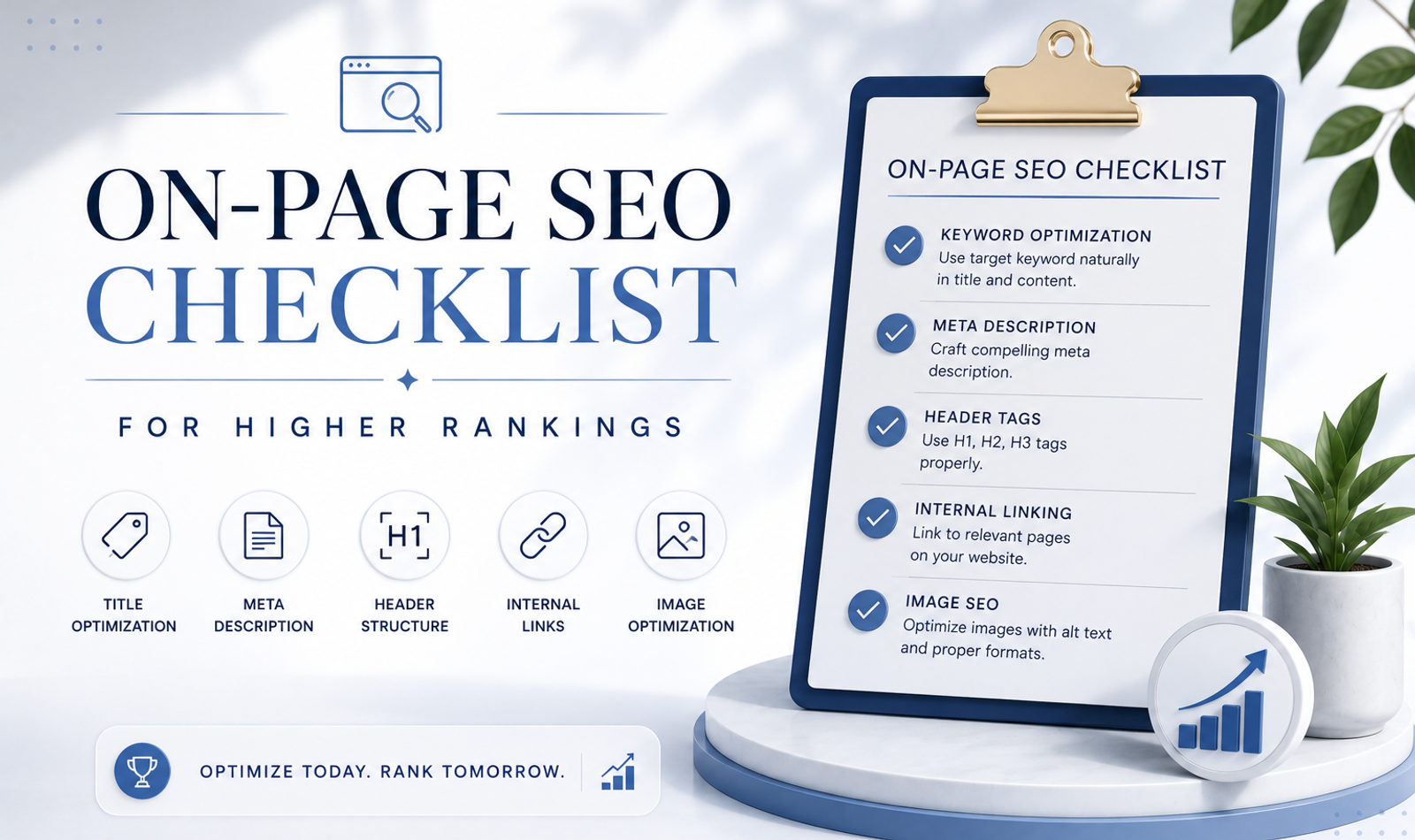
A complete on-page SEO checklist should include search intent, primary keyword, SEO title, meta description, clean URL, H1 tag, H2 and H3 headings, helpful content, keyword placement, internal links, image optimization, alt text, schema markup, breadcrumbs, mobile usability, page speed, FAQs, trust signals, CTAs, indexing and regular updates.
When these elements work together, your page has a better chance of ranking higher and converting visitors.
The strongest SEO pages are not only optimized for search engines.
They are also helpful for people.
On-Page SEO for Service Pages
Service pages should target high-intent keywords.
For example, an SEO service page may target “SEO services in India” or “SEO agency for small business.”
A strong service page should explain the service clearly.
It should include benefits, process, industries served, proof, FAQs, case studies and a clear CTA.
The page should answer customer questions before they contact you.
Service pages should not be too thin.
They should build enough trust for the visitor to take action.
Internal links should connect service pages with related blogs, case studies and contact pages.
On-Page SEO for Blog Posts
Blog posts are useful for informational keywords.
They help attract users who are learning, researching or comparing options.
A strong blog should include a clear title, helpful introduction, proper headings, detailed explanation, examples, FAQs and internal links.
Blogs should not only bring traffic.
They should guide readers towards relevant services.
For example, a blog about on-page SEO can link to SEO services, website-development services and SEO-audit pages.
This turns informational traffic into business opportunity.
On-Page SEO for Local Businesses
Local businesses need on-page SEO for city and location-based searches.
A local service page should include the city name naturally in the title, headings, content, meta description and FAQs.
For example:
- SEO Services in Chandigarh
- Digital Marketing Agency in Mumbai
- Luxury Wedding Planner in Delhi NCR
The content should include local relevance.
Mention service areas, nearby markets, local customer needs, testimonials and local examples.
Do not create copied location pages.
Each local page should provide unique value.
A focused local SEO strategy for Mumbai businesses can help improve city-specific organic visibility and Google Maps discovery.
Local on-page SEO works best with Google Business Profile optimization and customer reviews.
On-Page SEO for AI Overview Visibility
AI Overview visibility depends on useful, structured and clear content.
To improve AI Overview readiness, answer questions directly, use descriptive headings, add FAQs, include definitions, explain steps and provide practical examples.
Avoid vague and generic writing.
Make your page easy to understand.
For beginner topics, explain concepts simply.
For service topics, explain process, benefits and outcomes.
For business topics, add examples and expert insights.
On-page SEO and AI Overview optimization should work together.
The clearer your content is, the easier it is for users and search systems to understand.
Teams using AI in their workflow can also follow suitable AI content-creation tools and best practices while maintaining human review, originality and brand accuracy.
Common On-Page SEO Mistakes
One common mistake is targeting the wrong keyword.
If the keyword does not match the page intent, the page may attract the wrong audience.
Another mistake is writing weak title tags.
A title should be clear, keyword-focused and useful.
A third mistake is using messy headings.
Headings should create structure, not confusion.
Many websites also ignore image SEO.
Large images, missing alt text and poor file names can reduce performance.
Another common mistake is not adding internal links.
Without internal links, users and search engines may not discover important pages.
Some businesses write thin content that does not answer the search query properly.
Others add too many keywords and make the content unreadable.
The best on-page SEO is clear, helpful and natural.
Frequently Asked Questions
What Is On-Page SEO?
On-page SEO is the process of optimizing individual website pages using titles, headings, content, URLs, images, links, schema and user experience.
Why Is On-Page SEO Important?
On-page SEO helps search engines understand your page and helps users find useful information, which can improve rankings, traffic and conversions.
What Is Included in an On-Page SEO Checklist?
An on-page SEO checklist includes title tags, meta descriptions, URLs, headings, keyword placement, content, internal links, image SEO, schema, speed and mobile usability.
How Do I Optimize a Title Tag?
Use the primary keyword naturally, keep the title clear, match search intent and make it useful enough for users to click.
Are Meta Descriptions Important for SEO?
Meta descriptions may not directly guarantee rankings, but they can improve click-through rate by explaining the value of your page in search results.
How Many H1 Tags Should a Page Have?
Most pages should have one clear H1 that describes the main topic of the page.
What Is Image Alt Text?
Alt text is a written description of an image. It helps search engines understand images and improves accessibility for users.
Do Internal Links Help SEO?
Yes. Internal links help users explore related content and help search engines discover and understand your website structure.
What Is Schema Markup in SEO?
Schema markup is structured data that helps search engines understand page content more clearly and may support enhanced search results.
How Do I Optimize for AI Overviews?
Create clear, helpful and structured content with direct answers, definitions, FAQs, examples and strong topical coverage.
Conclusion
On-page SEO is one of the most important steps for improving website rankings, organic traffic and lead generation.
It helps search engines understand your pages and helps users find the information they need.
A strong on-page SEO checklist includes search intent, primary keyword, SEO title, meta description, clean URL, H1 tag, H2 and H3 headings, helpful content, internal links, image optimization, schema markup, mobile usability, page speed, FAQs, trust signals and clear calls to action.
In 2026, on-page SEO is also essential for AI Overview optimization, GEO and answer-engine visibility. Search engines and AI-powered systems need clear, structured and useful content that answers real user questions.
The best on-page SEO does not feel forced.
It feels helpful.
It improves ranking potential, builds trust and guides visitors towards action.
Improve Your Website With On-Page SEO
At Double Trouble Studio, we help brands improve rankings, website performance and digital visibility through SEO strategy, content optimization, technical SEO, website development, digital marketing, PR and performance-focused brand growth.
Businesses looking for website development and digital marketing services in Mumbai can work with our team across keyword strategy, page optimization, content structure, internal linking, speed and conversion improvement.
A specialised approach to SEO for luxury brands can also help premium businesses improve authority without weakening their positioning or brand voice.
With the right on-page SEO checklist, your website pages can become stronger discovery, trust-building and conversion assets for your business.
Contact Double Trouble Studio for on-page SEO, technical audits, website development, content optimization, local SEO and long-term organic growth.
📩 info@dtsworld.in 📞 +91 80000 06021 📍 Andheri West, Mumbai
Need this for your brand?
Let DTS build your next campaign.
From PR, celebrity management and events to websites, social media, SEO and AI video production — Double Trouble Studio helps brands grow with strategy and execution.
Discuss Your Requirement →